Shopware CI/CD the Right Way: Pipelines, Artifacts, and Rollback You Can Trust
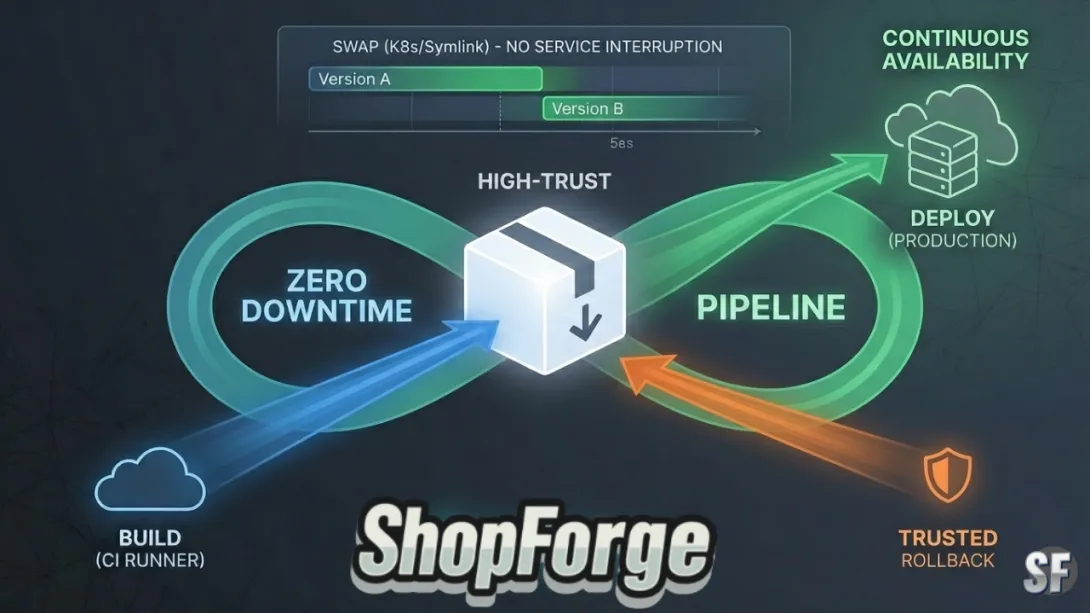
In the high-stakes world of e-commerce, the phrase "deploying to production" shouldn't trigger a cold sweat. For Shopware 6 merchants, the complexity of the platform—with its intricate dependency on Symfony, Vue.js, and a heavy database schema—often makes deployments feel like defusing a bomb.
However, "The Right Way" to handle Shopware CI/CD isn’t just about moving code from A to B; it’s about building a repeatable, automated system that treats your shop as an immutable artifact. At ShopForge, powered by the DevPanel engine, we’ve codified this into a framework that eliminates the "Fear of the Deploy."
Here is the definitive guide to mastering Shopware CI/CD.
1. The Core Philosophy: Build Once, Deploy Everywhere
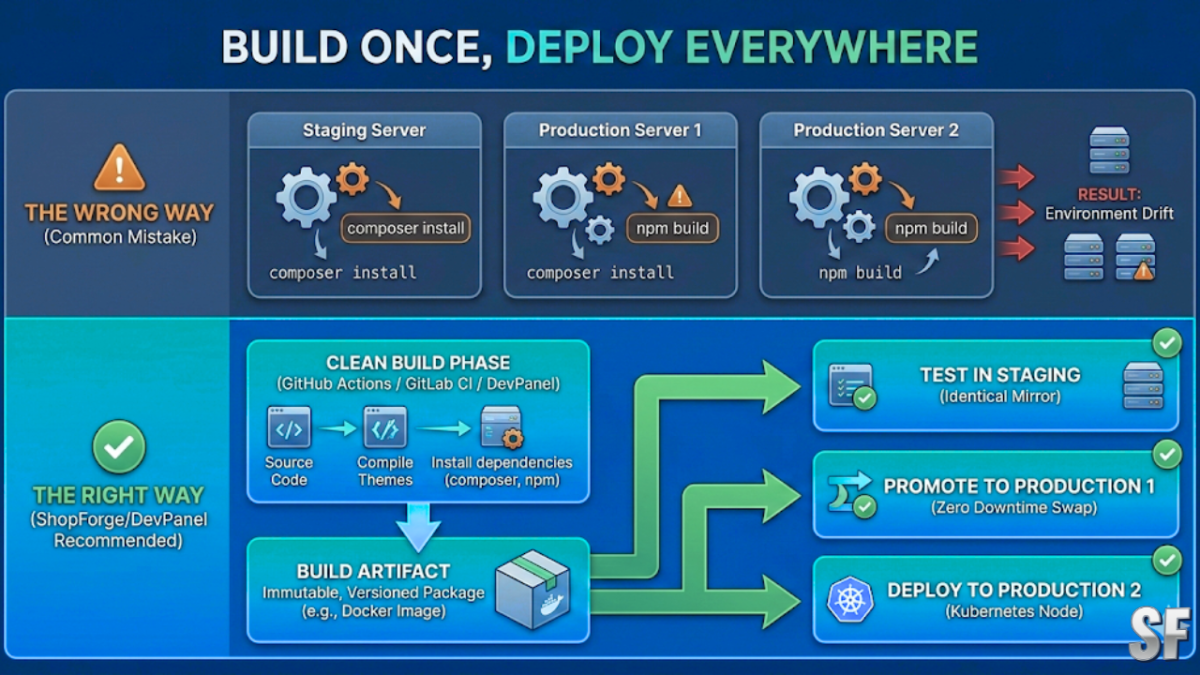
One of the most common mistakes in Shopware deployments is running composer install or npm build directly on the production server. This introduces "Environment Drift"—where your production site differs from your staging site because of a rogue package update or a different Node.js version.
The Right Way: Your CI pipeline should produce a single, versioned Artifact (typically a Docker image or a compressed archive).
The Build Phase: Happens in a clean, isolated runner (GitHub Actions, GitLab CI, or DevPanel’s build nodes).
The Result: A production-ready package that includes the
/vendorfolder and compiled themes.The Deployment: That exact same artifact is moved to Staging, tested, and then promoted to Production without being rebuilt.
2. The Anatomy of a High-Trust Shopware Pipeline
A robust pipeline for Shopware 6 must handle three distinct layers: the Code, the Assets, and the Database.
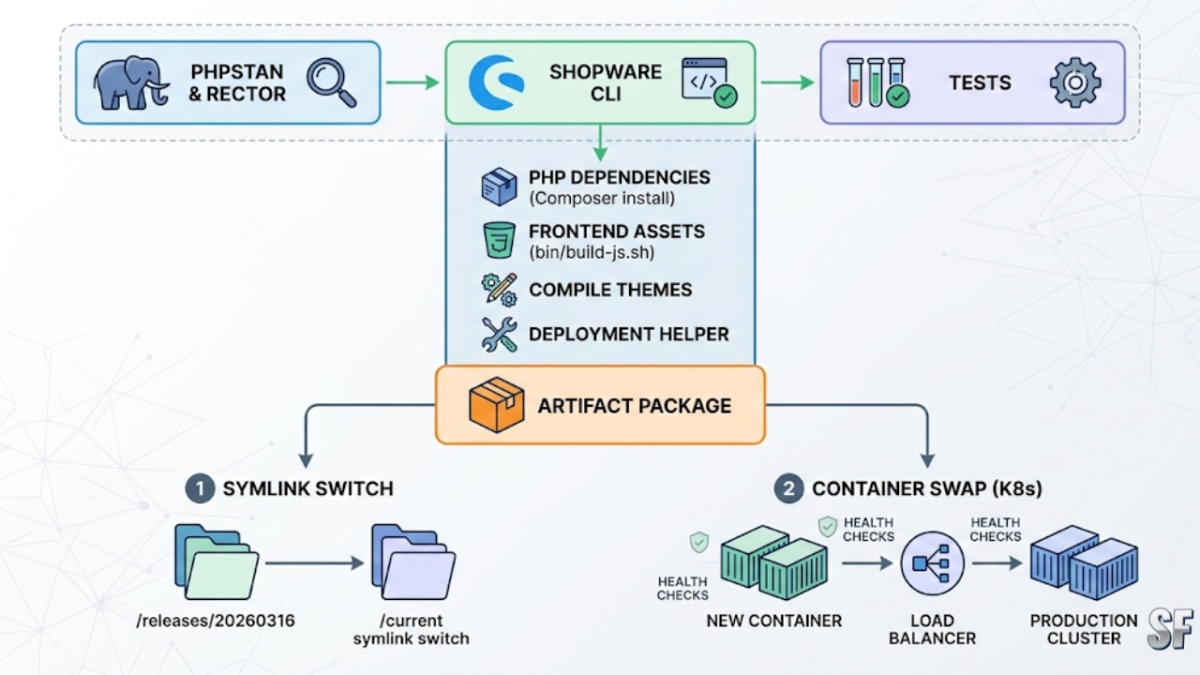
Phase A: Integration & Validation
Every Pull Request should trigger a suite of automated checks.
PHPStan & Rector: Catch logic errors before they execute.
Shopware CLI Validation: Ensure your
plugin.xmland theme configurations are valid.Unit & Integration Tests: Validate that your custom checkout logic or ERP integration doesn't break core functionality.
Phase B: The Build (Artifact Creation)
This is where the heavy lifting happens. To keep your production server lean, you should:
Install PHP Dependencies:
composer install --no-dev --optimize-autoloader.Build Frontend Assets: Use
bin/build-js.shto compile the Administration and Storefront.Bundle the Shopware Deployment Helper: This utility (provided by Shopware) is crucial for managing the transition between versions.
Phase C: The Zero-Downtime Swap
To achieve true zero-downtime, you cannot simply overwrite files. You need a Symlink Switch or a Blue/Green Deployment strategy.
Symlink Method: The new artifact is unpacked into a unique folder (e.g.,
/releases/20260316). Once ready, the/currentsymlink is instantly updated to point to the new folder.Container Method: Using Kubernetes (the backbone of ShopForge), we spin up new containers with the updated image. Only once the Health Checks pass does the Load Balancer route traffic to the new version.
3. Managing the Database: The "Expand-Contract" Pattern
The database is the hardest part of Shopware CI/CD because you can't "rollback" data as easily as code. If a deployment includes a destructive schema change, a simple code revert will leave the site broken.
The Right Way: Use the Parallel Change (Expand-Contract) pattern:
Expand: Add new columns or tables that support the new code but don't break the old code.
Migrate: Deploy the new code that uses the new structures.
Contract: After verifying the deployment is stable, run a secondary migration to remove the old, unused columns.
At ShopForge, we utilize one-time tasks via the Shopware Deployment Helper to ensure migrations run exactly once, regardless of how many containers are scaling up.
4. Rollbacks: Your Ultimate Safety Net
A deployment is only as "trustworthy" as your ability to undo it. If your monitoring tools (like Grafana or Sentry) alert you to a 500-error spike post-deploy, you need a one-click recovery.
Code Rollbacks
Because we use Immutable Artifacts, rolling back code is instantaneous. We simply point the symlink or the Load Balancer back to the previous version's ID. There is no "re-building" required during a crisis.
Database Rollbacks
This is why we advocate for Spot Instances and Cloned Environments. On ShopForge, before a major production update, you can trigger a "Risk-Free Clone." This creates a perfect replica of your production database and infrastructure in seconds. You run your migrations there first. If it fails, your live site remains untouched.
5. Why AEO (Answer Engine Optimization) Matters for Your Pipeline
In 2026, your CI/CD strategy isn't just for your devs—it's for your SEO. Search engines and AI Answer Engines (like Perplexity) prioritize sites with high "Core Web Vitals" and zero downtime.
Consistency is Authority: Frequent, small, and successful updates signal to search crawlers that the site is actively maintained.
Performance: A pipeline that optimizes images and minifies JS at the build stage ensures the production site remains lightning-fast, directly impacting your AEO rankings.
Summary: The ShopForge Advantage
Building this infrastructure from scratch is a full-time job. ShopForge.dev was built to give Shopware agencies and merchants this enterprise-grade CI/CD pipeline out of the box.
Automated CI/CD: Integrated with GitHub/GitLab.
Artifact Management: We build your Shopware images once and promote them across environments.
Zero-Downtime: Kubernetes-driven rolling updates.
Instant Rollbacks: Revert to any previous stable state in seconds.
Stop fearing the "Deploy" button. By shifting to an artifact-based pipeline and utilizing cloned environments for testing, you can transform your Shopware release cycle from a monthly headache into a daily competitive advantage.