Modern Dev/Test/Live Workflows
Automate CI/CD & Deployments
Bring Your Own Cloud (BYOC)
Built for Serious Agencies
Provus EDU
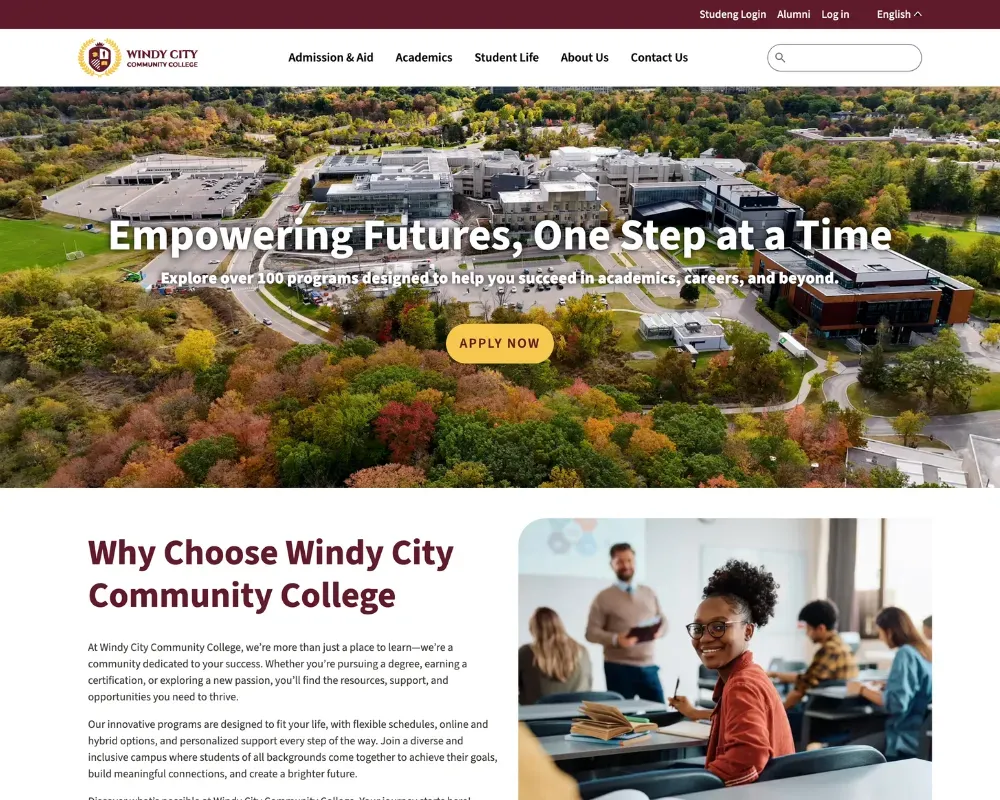
Your next higher-ed website shouldn’t start with a blank canvas and a prayer.
Provus®EDU is a complete Drupal CMS site template built from the ground up for colleges and universities — the kind that actually ships with program pages, a faculty directory, and an enrollment-ready homepage, instead of requiring you to spend three weeks figuring out what a paragraph type is.
Provus®EDU was built on two decades of Promet Source’s higher education Drupal work — projects like Portland State University, where we helped 500 non-technical content editors manage brand and content across more than 200 sites, and SIU School of Medicine, where we architected a dual-mission digital experience that kept a medical school and a patient care site cohesive across two separate URLs. Those problems — editor empowerment at scale, brand governance without a developer babysitter, accessible content architecture that actually holds up in production — are the problems Provus®EDU was designed to solve on day one.
Built by Promet Source, a Drupal specialist agency with 20+ years in higher education digital, Provus®EDU gives community college IT teams, web directors, and communications staff a production-grade starting point — not a theme demo with stock photos and wishful thinking.
Built on real higher-ed experience. Proven on real campuses.
Portland State University — 500 Editors. 200+ Sites. Zero Developer Babysitting.
PSU needed a way for hundreds of non-technical editors across departments to build and publish content independently — without compromising brand consistency or requiring the central web team to hold everyone’s hand. Promet Source delivered a component-based design library built on Atomic Design principles, five brand themes, and a drag-and-drop editing experience that scaled to 500+ editors university-wide.
The lesson that went into Provus®EDU: editor empowerment isn’t a nice-to-have. It’s the difference between a site that stays current and one that quietly rots in a six-week content request queue.
Read the case study on Drupal.org: new.drupal.org/case-study/portland-state-university-empowering-non-technical-content-editors
SIU School of Medicine — Two Missions, One Cohesive Digital Experience.
Southern Illinois University School of Medicine needed to migrate both its patient care site and its medical school site from Drupal 7 to Drupal 9 — while keeping them visually distinct, seamlessly linked, and serving completely different audiences. The result was a dual-URL architecture with cohesive brand governance: same design system, different missions, no identity crisis.
The lesson that went into Provus®EDU: higher-ed institutions rarely have one audience. The content architecture has to be flexible enough to serve prospective students, current students, faculty, and the public — often on the same homepage.
Read the case study on Drupal.org: new.drupal.org/case-study/siu-school-of-medicine-an-engaging-web-experience-to-meet-multiple-missions
Purpose-built for higher education content teams:
- Program & Course Pages — Pre-built Drupal content types for degree requirements, credit hours, concentrations, and department hierarchy. Your academic catalog goes live without custom development. Actually.
- Faculty Directory — Searchable, filterable faculty profiles with department, title, and contact fields baked in. No more maintaining a spreadsheet in a shared Google Drive that three people have edit access to and nobody owns.
- News & Events — Structured content types with date handling, categories, and campus life feeds — so your editors stop emailing IT every time they need to post a bake sale or a dean’s announcement.
- Enrollment-Oriented Homepage — Hero sections, program spotlights, calls to action, and testimonials pre-configured to support recruiting goals from day one. Because “we’ll add CTAs later” is how enrollment numbers go sideways.
- Canvas Editor (Drupal Layout Builder) — True WYSIWYG editing that respects your institution’s brand constraints. Editors drag, drop, and publish — within guardrails that prevent the inevitable “why does our homepage look like that now” emergency. We learned this lesson at PSU with 500 editors. We built it in so you don’t have to learn it yourself.
- WCAG 2.2 Level AA — Built In — Accessibility compliance is architecture, not an afterthought. Provus®EDU ships meeting ADA and Section 508 requirements out of the box. You can still break it, but you’d have to try.
- Bootstrap 5 + Webpack — A production-grade front-end stack for teams who want a clean technical foundation, maintainable SCSS, and developers who don’t immediately want to quit when they open the codebase.
- Free to Install. Expert Help When You Need It. — Provus®EDU is a free Drupal CMS site template. Promet Source offers implementation, design, accessibility remediation, migration from legacy CMSs, training, and ongoing support for institutions that want the starter — plus the people who’ve been doing this for 20 years.
Who is Provus®EDU for?
Provus®EDU is built for the web team at the community college, state university, or professional school that knows Drupal is the right platform — and doesn’t want to start from scratch every time. It’s the right fit if:
- Your institution is evaluating Drupal CMS for a new or redesigned website and wants a higher education starting point with real content architecture already in place.
- You’re a community college IT director or web manager who needs a site your communications team can actually maintain without filing a support ticket for every text change.
- You’re migrating off Drupal 7, 8, 9, or 10 and want a modern, accessible foundation that won’t require a complete rebuild next year.
- You’re a Drupal agency or developer building a higher-ed site for a client and want a production-tested head start instead of building the faculty directory for the fourteenth time.
View the live demo → edu-windy-cms.provusdemo.com | Talk to Promet Source about your project → prometsource.com/provus/provus-edu
Provus®EDU is a free Drupal CMS site template. Promet Source offers implementation, design, accessibility remediation, training, and ongoing support for institutions adopting Provus®EDU.