The 2026 Shopware Data Mapping Secret: Why Your Migration Tool is Only as Good as Your Hosting
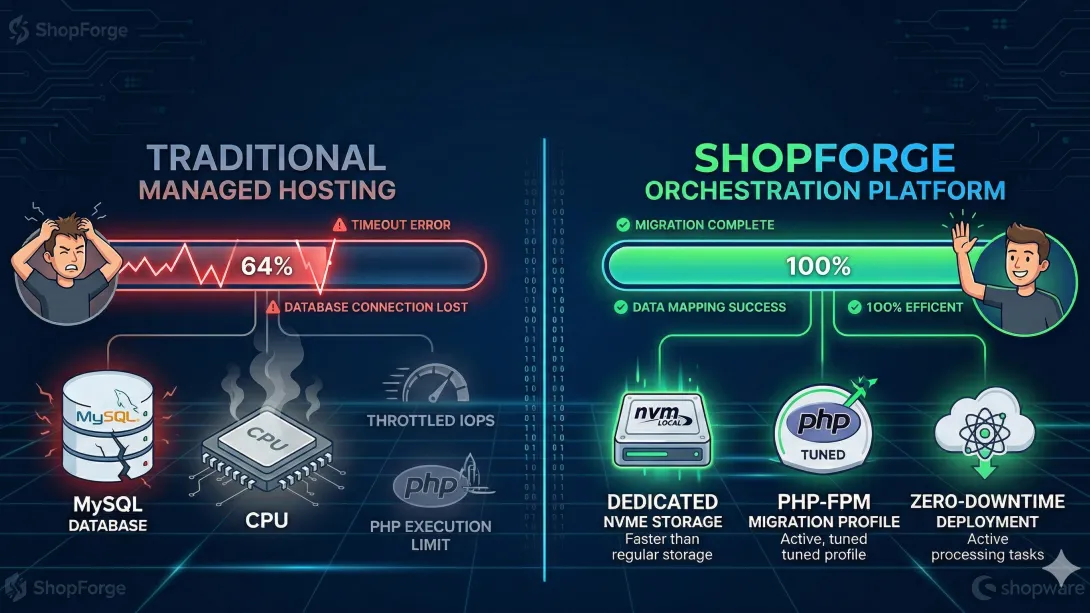
You’ve mapped your custom fields, audited your Shopware 5 (or Magento) legacy data, and fired up the Migration Assistant. Everything looks perfect until the progress bar hits 64% and hangs. The logs spit out a generic 504 Gateway Timeout, a resource-limit-reached error, or the dreaded MySQL has gone away.
Most development teams react by debugging the migration tool, trimming the dataset, or manually batching the transfer. But after orchestrating hundreds of enterprise-scale migrations on ShopForge, we’ve identified a recurring pattern: Most migration failures are actually "Infrastructure Exhaustion" events disguised as data errors.
As we enter the era of Shopware 6.7, the technical overhead of moving large datasets has shifted. With the platform's move to a more intensive Data Abstraction Layer (DAL) and refined indexing strategies, your hosting isn't just a place where the site "lives"—it is the engine that determines if your data survives the move.
1. The IOPS Trap: Beyond "Disk Space"
When you migrate 100,000 products, your server is performing a high-concurrency "write-sprint." It’s not just moving rows; it’s generating SEO URLs, building keyword indexes, and calculating variant inheritance on the fly.
The Bottleneck: Traditional managed hosts (and budget cloud providers) use shared storage with throttled IOPS (Input/Output Operations Per Second). During a migration, your database hits the IOPS ceiling almost instantly. The system enters a "Wait" state, the PHP process exceeds its execution window, and the migration collapses.
The ShopForge Solution: Our Kubernetes nodes utilize dedicated NVMe-backed local storage with unthrottled IOPS. We treat migration as a "Burst Event." By decoupling the storage layer and providing raw disk throughput, we ensure that complex data mappings—like those involving multi-dimensional product variants—return in milliseconds, preventing the database from "hanging" the application.
2. PHP-FPM Orchestration: Tuning for the "Migration Sprint"
The default PHP settings on 99% of managed hosts are tuned for "Steady State" browsing—handling small, fast requests from shoppers. A migration is the exact opposite: it is a massive, long-running, memory-hungry process.
The Bottleneck: Standard hosts cap
memory_limitat 512MB andmax_execution_timeat 60 or 120 seconds. When a migration script hits a complex product category with thousands of dependencies, it runs out of "breath."The ShopForge Solution: Because ShopForge allows for Environment-Specific Overrides, we enable a "Migration Profile" for your staging pods. We temporarily scale your PHP workers and memory limits to "Enterprise" levels specifically for the migration window. Once the data is verified, we scale back to production-efficient levels. This is the beauty of Elastic Orchestration—you have the power when you need it, without paying for it when you don't.
3. The 10-Second "Sandbox" and Atomic Rollbacks
Data mapping is an iterative science. You migrate, you find a discrepancy in the tax calculations or the media folder structure, and you need to try again. On traditional hosting, "cleaning" a database to restart a migration is a two-hour ordeal of manual drops and restores.
The Bottleneck: Developers often settle for "good enough" mapping because the time cost of a "clean retry" is too high.
The ShopForge Solution: We use Infrastructure Snapshots. Before you initiate the transfer, you take a snapshot of your clean Shopware 6.7 environment. If the mapping is off? You don't "clean" the database. You rollback the entire environment—files, database, and configurations—in 10 seconds. This "Fail Fast, Iterate Faster" approach is how we’ve seen agencies cut migration timelines from weeks to days.
4. Background Indexing and the RabbitMQ Bottleneck
Shopware 6.7 relies heavily on asynchronous tasks. While the migration tool is writing product data, the Shopware Core is trying to index those products for search and category visibility.
The Bottleneck: If your host runs indexing on the same CPU core as the migration process, they will fight for resources. This creates "Zombie Tasks" in your message queue—tasks that are "started" but never finish, leading to a store that looks "empty" even though the database is full.
The ShopForge Solution: Every ShopForge environment includes a dedicated RabbitMQ worker silo. By offloading the indexing tasks to a separate compute node, we allow the migration tool to write data at maximum speed without being slowed down by the background "noise" of indexing. This parallel processing ensures that when the progress bar hits 100%, your store is actually ready to go live.
5. Persistent Object Caching (Redis 7.2)
During a migration, the Data Abstraction Layer (DAL) is working overtime. If your server is constantly hitting the disk for metadata, the process slows to a crawl.
The Bottleneck: Most hosts use a single Redis instance for everything—or worse, they use the filesystem for caching.
The ShopForge Solution: We deploy a multi-instance Redis 7.2 stack. During migration, one instance is dedicated solely to the Entity Cache. This ensures that the DAL can retrieve schema information instantly, allowing the migration tool to focus entirely on data injection.
Data Integrity is an Infrastructure Choice
A migration tool is just a bridge. If the foundations on either side are shaking, the bridge will collapse. To ensure a successful move to Shopware 6.7, you must move beyond the CSV files and audit your hosting's ability to handle high-concurrency writes, unthrottled IOPS, and asynchronous message queuing.
Stop fighting with timeouts. Start migrating with orchestration.